Glass Widgets
- 4.5
- Rating
- 100.00K
- Installs
- $0.98
- Price

 Analysis by App-foxy
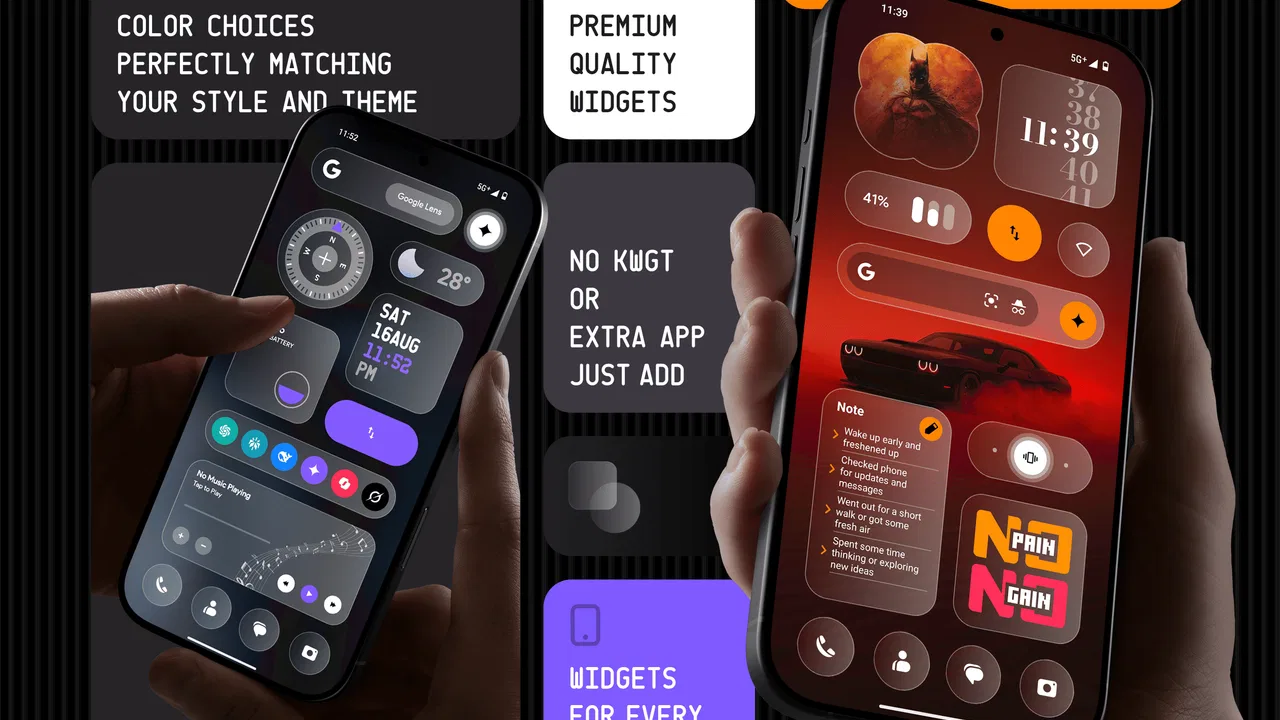
I have a soft spot for personalization apps that make a phone feel more like mine without turning setup into a weekend project. Glass Widgets takes that idea in a focused direction: it is a personalization app from AppsLab Co. built around a large collection of widgets with a glass-inspired visual treatment. After spending time arranging it on both the home screen and lock screen, I found it most appealing for people who care about visual consistency and want more than the basic widgets supplied by the phone.
The central attraction is easy to understand. Instead of treating a widget as a plain information box, the app makes it part of the overall wallpaper and icon arrangement. The transparent, polished look can make a busy screen feel calmer, especially when several widgets share the same visual language. That does not automatically make every layout better, though. The style works best when the rest of the screen is deliberately arranged, and it can feel excessive if you prefer a simple, high-contrast interface.
My overall view is positive, but I would not recommend buying it solely because the word “glass” sounds attractive. The important question is whether you want a design system for your screen or merely one extra clock widget. If you enjoy adjusting spacing, grouping information, and matching your lock screen to your home screen, this app is much easier to justify. If you want the most practical information at a glance with no visual tweaking, the usual built-in tools may suit you better.
You May Also Like

 Blood Strike: 2.5 Anniversary
Blood Strike’s Loadouts Turn Every Drop Into a Tactical Gamble
A close look at Blood Strike’s custom loadouts: how fast access to signature weapons reshapes its battle royale rhythm, rewards preparation, and narrows the gap between fights.

 Pandora - Music & Podcasts
Pandora’s Music Is Easy to Start, but Harder to Recover
Pandora’s strength is its low-effort path from a seed to a station. Its weak spot is how much confidence it asks you to place in connection, setup, and quiet recovery.

 8 Ball Pool
 Is Built on Rivalries, Rematches, and Routine
A close look at the rivalries, rematches, shared routines, and unanswered safety questions that turn a quick pool match into a persistent mobile community.

 Samsung Music
’s Quiet Strength Is Playing What You Already Own
Its reach comes less from spectacle than from dependable access to a personal library. That simplicity is both the app’s strongest retention engine and its ceiling.

 AccuWeather: Weather Radar
AccuWeather Review: A Quick, Clear Forecast for Everyday Decisions
For everyday plans, the best forecast is the one you can understand quickly. AccuWeather makes rain timing, radar, and local conditions easy to act on, with a few trade-offs.

 Hill Climb Racing
Why Hill Climb Racing Still Turns Crashes Into One More Run
A tiny car, a bumpy hill and one more upgrade: Hill Climb Racing keeps resurfacing because its simple chaos makes every near-miss feel personal.
More From Our News Desk



What I looked for before settling on a layout
Before settling on a layout, I focused on what I actually check during an ordinary day and how much screen space those habits deserve. That kept the design from becoming a collection of attractive panels with no clear purpose, and it gave me a better way to judge whether the glass treatment would remain useful after the initial novelty wore off.
Visual consistency matters more than the raw widget count
The app offers more than 350 widgets, but I found the number less important than the way the collection works together. A big library is useful only when it helps you build a coherent screen. Here, the glass-style finish gives the available choices a common thread, so a clock, calendar area, weather panel, or shortcut-style element can look as though it belongs to the same setup rather than having been collected from unrelated apps.
That consistency is the first decision criterion I would use. Ask yourself whether you want one widget to stand out or several elements to share a visual identity. Glass Widgets is at its strongest in the second situation. A single decorative widget can look nice, but the design idea becomes more convincing when the home screen and lock screen are treated as parts of one arrangement.
I also paid attention to readability. Translucent styling can be elegant, but it depends on the wallpaper behind it. A pale image, a detailed photograph, or a background with strong contrast can make fine text harder to read. I would start with a quiet wallpaper, place the most important information in the clearest area, and only then add decorative elements. This is a more reliable workflow than filling the screen first and trying to rescue legibility afterward.
Decide how much control you actually enjoy
Personalization has a hidden cost: attention. Every additional choice can improve the result, but it can also make a quick setup feel like design work. I found the app more satisfying when I approached it with a specific goal, such as creating a clean morning screen or reducing visual clutter around frequently used shortcuts.
A useful approach is to build one screen around a single priority. For example, I would place the time and the information I check most often near the top, then use a smaller matching widget for secondary details. This prevents the glass effect from becoming a layer of decoration over an already crowded display. It also makes it easier to decide which widgets deserve space and which are merely attractive.
Another practical consideration is the phone’s operating system. The app requires Android 12 or later, so it is aimed at relatively modern Android devices rather than older phones kept on an earlier release. That requirement is worth checking before paying, particularly if you are using an older handset or a device that has not received recent system updates.
The price changes the way I judge it
Glass Widgets is listed at $0.98, with optional in-app purchases ranging from $1.99 to $9.49 per item. I see that as a low entry price with a possible temptation to keep expanding the setup. The initial payment is easy to understand, but the more important question is whether the content you actually want is included in the basic experience or whether your preferred style leads you toward additional purchases.
I would decide this before spending time perfecting a layout. Choose the screen you want, identify the essential widget types, and then see whether the app gives you enough flexibility without turning the process into repeated small purchases. For someone who wants a polished, unified look, that planning makes the cost easier to control. For someone who likes collecting every variation, the total can become less predictable.
Where the glass treatment makes a real difference
The strongest use case I found was a restrained home screen with a wallpaper that could show through the widgets. The finish helped the information feel integrated rather than boxed off. This is especially useful if you dislike the solid panels common in many standard widgets, but still want information visible without opening a separate app.
The lock screen is another area where the concept makes sense. A few carefully chosen elements can provide useful context while keeping the screen visually light. I would not try to place every available detail there. Lock screens are seen briefly, often in poor lighting or while moving, so the best arrangement is the one that answers a small number of questions quickly.
The practical strength is not transparency by itself; it is the shared visual language across multiple screen spaces. That is the difference between a decorative download and a personalization tool I could keep using. When the same treatment works on the home screen and lock screen, the phone feels intentionally arranged rather than merely customized one piece at a time.
Small layout decisions have a bigger effect than expected
One non-obvious lesson from using this kind of app is that widget size should follow reading distance, not just available space. A compact widget may look elegant in the editor but become frustrating when you check it while walking or when the phone is on a desk. I would reserve the clearest, largest area for information that genuinely saves me a tap, and use smaller glass elements for context or atmosphere.
I also found that grouping similar information reduces the visual cost of transparency. If the screen contains too many separate translucent surfaces, the background can become visually fragmented. Fewer, better-placed widgets usually look more premium than a full grid of matching panels. This is a useful trade-off: the app gives you many options, but a good result often comes from using fewer of them.
Finally, I would test the layout with both a bright and a dark wallpaper before deciding that it is finished. A design that looks excellent over one image may lose contrast over another. This matters if you change wallpapers often. People who enjoy seasonal or photographic backgrounds may prefer a more solid widget style that stays readable in more situations.
How it compares with the usual alternatives
The most obvious alternative is the standard widget collection already included with Android or supplied by individual apps. Those options are often better when function comes first. They tend to be familiar, quick to place, and closely connected to the service they represent. If your main goal is checking information with minimal adjustment, the built-in route is usually the efficient choice.
Dedicated customization tools represent another category. They may offer deeper control over typography, spacing, colors, or custom layouts. That can be preferable for someone who wants to reproduce a very specific design or build a screen from individual components. The trade-off is effort: more control generally means more decisions, more experimentation, and a greater chance that two widgets will not look as though they belong together.
Glass Widgets sits between those approaches. It is more visually focused than ordinary system widgets, but less intimidating than a fully open-ended design toolkit. Its advantage is the ready-made glass direction. Its limitation is that people who want unlimited visual freedom may eventually find the shared style restrictive. I would choose it for a coordinated look, not as a replacement for every kind of widget customization.
Who should use it, and who should skip it
I think it is a good fit for someone who changes wallpapers, enjoys arranging a home screen, and wants the lock screen to feel connected to the rest of the phone. It also suits users who are tired of mixing widgets from unrelated apps and would rather start with a collection that already has a recognizable finish.
It is less suitable for a person who wants a purely utilitarian screen, dislikes translucent interfaces, or rarely changes the default arrangement. It may also be the wrong choice if your phone cannot run Android 12 or later. Those are not minor details, because the app’s appeal depends heavily on both the visual style and the ability to use it on a compatible device.
Families should find the age classification straightforward: it is rated Everyone. That makes the app broadly approachable from a content perspective, although younger users may still need guidance if they are making purchases inside the app. I would personally treat the optional purchases as something to review before handing the phone to a child.
What switching actually costs
Moving from built-in widgets is not difficult, but it does take a little patience. The cost is not only the purchase price; it is the time spent rebuilding a familiar screen and deciding whether the visual improvement is worth the space each widget uses. I would take a screenshot of the existing layout first, then recreate only the parts I use regularly rather than trying to duplicate everything immediately.
A gradual switch works best. Start with the home screen, live with it for a day, and then decide whether the lock screen needs the same treatment. This exposes a common problem early: a widget can look attractive during setup but provide little value in daily use. Removing it is not a failure. The point of personalization is to make the phone easier and more pleasant to use, not to display the largest possible collection.
There is also a maintenance cost when the wallpaper changes. Glass elements can require repositioning or a contrast check after a new background is applied. If you regularly change images, keep a simple version of the layout in mind so you can restore readability quickly. Users who prefer a “set it once and forget it” phone may find ordinary widgets less demanding.
How the app has developed so far
AppsLab Co. released Glass Widgets on August 22, 2025, and the current version is 1.3. That places it in a relatively early stage compared with long-established personalization tools, so I judge it mainly by the clarity of its current concept rather than by a long history of updates. The idea is focused: offer a broad widget collection with a premium glass-style finish for both major screen areas.
The app has reached over 100 thousand installs and holds a 4.5 average from around 6.1 thousand ratings, with 402 written reviews. Those figures suggest that the concept has found a receptive audience, while the written feedback is especially useful for spotting whether the style matches real expectations. I would still read recent comments before purchasing, because a visual customization app can feel very different depending on device, launcher, wallpaper, and personal taste.
The version number also reinforces my advice to approach it as a focused tool rather than a complete replacement for every personalization method. Its value comes from the glass collection and the way it helps unify a screen. If you need highly specialized controls, automation, or a completely custom design language, another category of app may remain necessary alongside it.
My recommendation after using it
I recommend Glass Widgets to Android users who want a coordinated, modern-looking screen and are willing to spend a little time choosing what deserves attention. The low starting price makes experimentation approachable, while the optional purchases mean I would set a personal limit before browsing deeply. The app is particularly convincing when used sparingly across both the home screen and lock screen.
I would skip it if your priority is maximum information density, guaranteed readability over any wallpaper, or zero setup effort. In those cases, system widgets or a more functional alternative will probably be a better match. I would also avoid buying it for an older Android phone that does not meet the minimum system requirement, since the visual idea cannot compensate for incompatibility.
For me, the deciding factor is whether the glass finish improves the way I interact with the phone rather than merely making screenshots look attractive. When I choose a calm wallpaper, keep the number of widgets under control, and give the most important information enough space, it succeeds. Glass Widgets is best understood as a curated visual layer for everyday screens, not as a universal answer to every widget need.
That makes the recommendation fairly clear. If you want your phone to feel deliberately designed and you enjoy small layout decisions, I think the app is worth trying. If you want widgets only as quick utility buttons and information panels, stay with the usual alternatives. The app wins through cohesion, not through replacing every tool already on your device, and that distinction is what should guide your decision.
FAQs for Glass Widgets
01What is Glass Widgets, and what does it do?
Glass Widgets is an Android widget application designed to place useful information directly on your home screen with a transparent, glass-style appearance. Depending on the available widget options, you can typically view items such as the time, date, weather, calendar events, or news without opening separate apps. Its main appeal is combining practical at-a-glance information with a clean, customizable visual style.
02Is Glass Widgets compatible with every Android phone and launcher?
Glass Widgets is intended for Android devices that support standard home-screen widgets, but the exact experience can vary depending on your Android version, phone manufacturer, screen size, and launcher. Some launchers may limit transparency, resizing, refresh behavior, or widget placement. Before downloading, check the app’s Google Play compatibility information and remember that certain features may look different on Samsung, Pixel, Xiaomi, or third-party launchers.
03How do I add Glass Widgets to my Android home screen?
After installing Glass Widgets, press and hold an empty area of your Android home screen and select the Widgets option. Find Glass Widgets in the list, choose the widget size or style you want, and drag it to the preferred location. You may then be able to resize it or adjust its appearance and information sources. The exact steps can differ slightly between Android launchers.
04Can I customize the appearance and information shown in Glass Widgets?
Customization depends on the specific version of Glass Widgets and the widget selected, but the app generally focuses on adjusting the visual presentation of home-screen information. Options may include transparency, text appearance, color, size, alignment, and the type of content displayed. Some settings can also be controlled through the widget itself or the application’s configuration screen, so available choices may vary by device.
05Does Glass Widgets affect battery life or require special permissions?
Because Glass Widgets can update information while remaining visible on the home screen, it may use a small amount of battery and background activity, especially when weather or other frequently refreshed data is involved. The impact is usually modest, but aggressive battery-saving settings can delay updates. Depending on its features, the app may request permissions related to location, notifications, calendar access, or internet connectivity; review each permission before granting it.
Pros
- Clean
- minimalist widgets that fit well with modern home screens.
- Offers useful at-a-glance information without opening full apps.
- Transparent designs can preserve visibility of wallpapers and icons.
- Lightweight widget collection with generally low resource demands.
- Good option for users who prefer subtle
- uncluttered customization.
Cons
- Some widgets may require extra setup before displaying the right information.
- Transparency can reduce readability on bright or detailed wallpapers.
- Customization options may feel limited compared with advanced widget apps.
- Certain features or widget styles may depend on the device launcher.
- Updates and compatibility can vary across Android versions and screen sizes.

Glass Widgets
Gallery